Live on the App Store · iOS 16+

Speak the mess.
Get the action.

ActionNote turns any voice note into a clean summary, a to-do list, and answers you can ask — in any language, even two at once. Just talk; the AI organizes the rest.

ENEnglish ARالعربية FRFrançais MIXTwo at once
Free for 5 notes a month · Your notes stay on your device + your iCloud
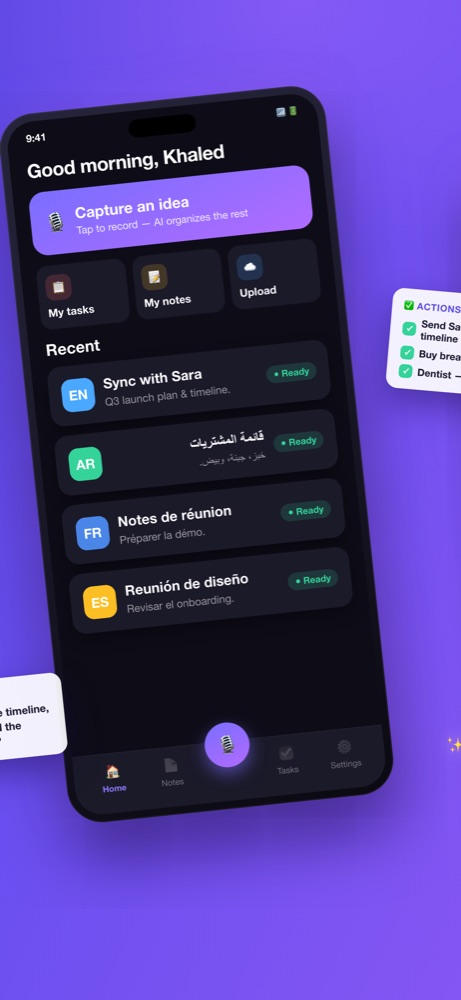
ActionNote home screen with notes in English, Arabic and French

How it works

No folders, no typing, no listening back. Three steps, ten seconds.

1

Talk

Tap record and say it how it comes out — rambling, half-formed, two languages at once. Or share a voice note in from WhatsApp.

2

Get the organized note

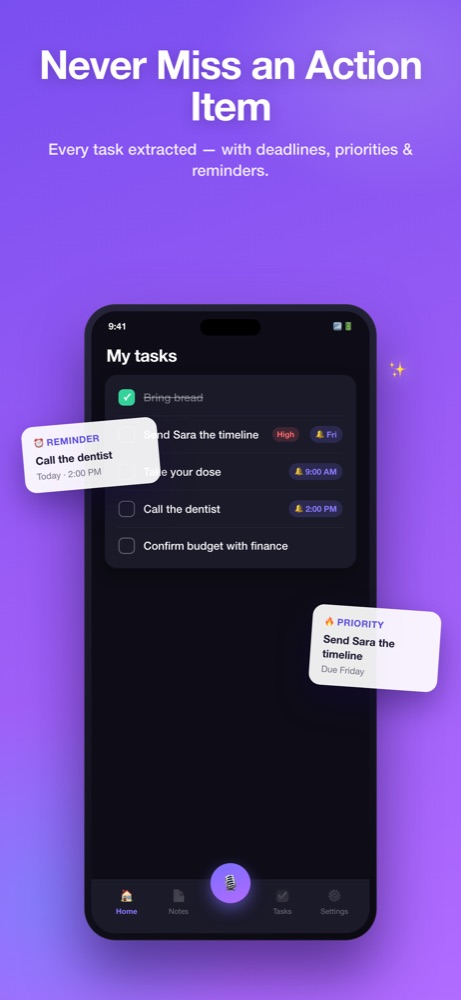
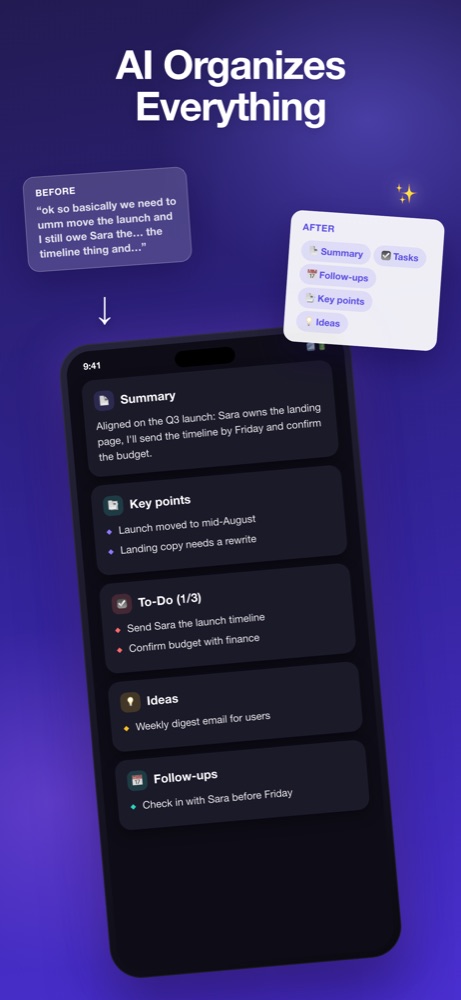
Seconds later: a title, a short summary, key points, and a task list with reminders that actually fire. The audio stays attached; you'll never need it.

3

Ask anytime

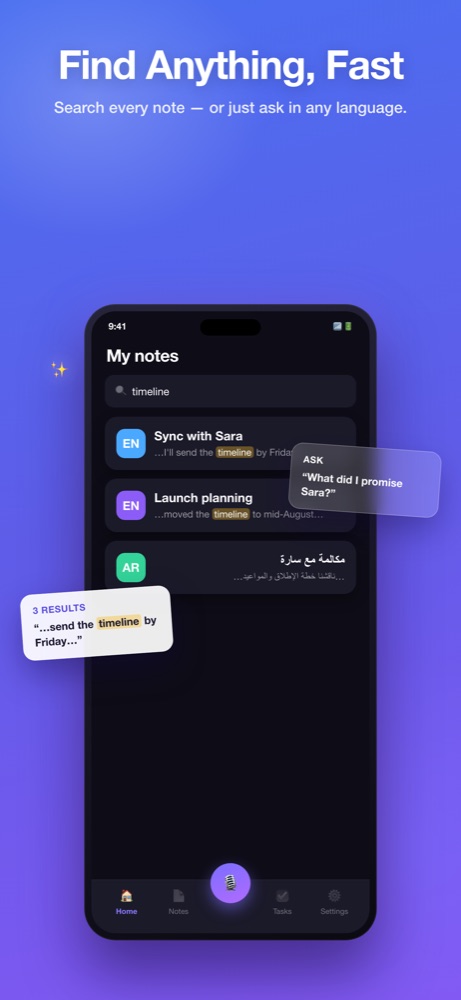
"What did I promise Sara?" Ask across everything you've ever captured and get the answer with the source note linked.

🚧 Version 2.0 · in build, not in the app yet

Next: Meeting Mode.

Today ActionNote is built for the note you speak in a minute. Meeting Mode is for the hour you sit through — a full in-person meeting or a whole lecture, recorded end to end, with the note building while it runs instead of after.

Long recordings Notes build while you record Still on your device + iCloud

Arriving on a new Pro+ tier at $9.99/month. Everything else on this page is in the app today.

Tell me how you'd use it No waitlist, no email capture — just a reply.
🎙️ SCREENSHOT — MEETING MODE Drop the real frame in when 2.0 ships.

One app, two rooms

The phone is already on the desk or the table. Pick the room you're in — it's the same ActionNote either way.

🎓 For lectures

Sit through it once.

Two hours, half in one language and half in another, and a lecturer who never repeats a definition. Put the phone on the desk, then read the summary on the walk out instead of re-listening at 1.5×.

Bilingual halls are the normal case. Code-switch mid-sentence; the note comes back organized in what you spoke.
Ask it back before the exam. "What did she say about the midterm?" — answered with the lecture cited.
Deadlines become reminders. Dates said out loud land in your task list, timed.
Download on the App Store The lectures case in full ›
💼 For meetings

Catch the hallway ask.

The meetings that cost you are the ones with no invite: the stand-up, the hallway ask, the debrief in the car. This isn't a bot that joins your call — it's the phone already in the room with you.

Works where a meeting bot can't. In person, on a table, no link and no invite required.
Commitments come out as tasks. What you promised, with a reminder, not a memory.
Ask across a quarter of them. "What did I promise Sara?" — answered with the note cited.
Download on the App Store The meetings case in full ›

Same app, same $4.99 Pro, same download — the only difference is the room you press record in.

Your voice, organized

Stop scrolling back through endless voice memos. Capture a thought and get exactly what matters.

🎙️

Just talk

Record a thought, meeting, or rambling memo — hands-free.

AI summaries

Every note returns a title, key points, and a to-do list.

Tasks & reminders

Turn talk into a checklist with timed reminders.

💬

Ask Your Notes

"What did I promise Sara?" Get answers from everything you've captured, with the source note cited.

🌍

Any language

Arabic, English & more — even mixed in one sentence. Detected and organized automatically.

☁️

Private & backed up

Notes stay on your device and your iCloud — never in a database of ours. Audio is processed, not kept.

📲

WhatsApp voice notes in

Share any voice note or audio file straight in — get the summary without ever pressing play.

🔒

Keeps recording

Lock the screen or switch apps mid-thought — the recording survives, and you get notified when the note is ready.

📤

Clean export

Every note exports as clean formatted text that pastes nicely into Notion, Todoist, or anywhere you live.
See it in action

From a rambling voice memo to organized notes, tasks, and answers.

AI organizes a ramble into summary, key points and tasks Ask Your Notes answering with source citations Task list with reminders

Simple pricing

Start free. Upgrade when the free notes stop being enough.

FREE

Starter

$0
forever
  • 5 organized notes every month
  • All languages, mixed mid-sentence
  • Ask Your Notes
  • WhatsApp voice-note import
  • Private: your device + your iCloud
7-DAY FREE TRIAL

Pro

$4.99
per month, or $29.99/year (save 50%)
  • Everything in Starter
  • Unlimited notes
  • Unlimited tasks & reminders
  • Priority support from the developer

A third tier, Pro+ at $9.99/month, arrives with Meeting Mode in 2.0. Nothing in Free or Pro moves behind it.

Questions people ask

Where do my notes live? Can you read them?

Your notes live on your iPhone and in your own iCloud. There is no ActionNote database. Audio is sent to the AI once for processing and is not kept on any server of ours.

Which languages work?

Whatever you speak — including two languages mixed in the same sentence. Arabic/English mid-sentence switching was the original reason the app exists. The note comes back organized in the language you spoke.

Can I record a whole meeting or lecture today?

Today ActionNote is built around shorter notes, and recording survives a locked screen. Full long-session recording with the note building as you go is Meeting Mode, in build for 2.0 — not in the app yet.

Do I have to listen back to my recordings?

Never. That's the whole point. The audio stays attached to each note in case you want it, but the summary, key points, and tasks replace listening.

Does recording stop if I lock my phone?

No — recording continues with the screen locked or while you use other apps, and you get a notification when your organized note is ready.

Is there an Android or desktop version?

iPhone first (iOS 16+). A Mac companion is on the roadmap, along with long-recording support for meetings and lectures. Android depends on how iOS goes.

What happens when I cancel?

Your notes are yours — they stay on your device and iCloud. You just go back to 5 new notes a month.

Missing something? Tell me.

ActionNote is built by one person, in public, and the roadmap is genuinely shaped by users — translate mode, audio markers, and Notion export all started as user suggestions. If the app doesn't do the thing you need, I want to know.

🚧 Coming: Siri capture 🚧 Coming: Mac app
💡 Suggest a feature

Turn the mess into action.

Free to start — capture your first 5 notes on us.

Download ActionNote